Latest Posts :
Recent Posts

Tips To Get A Job In A Startup


If you are about to complete your degree/college, or about to complete it. You might have thought of ways to get job quickly and in the best company. That is what every job seeker dreams for. It’s very important to get basic understanding of getting job process.


1 – Make an Impressive Resume:

Prepare an easy and impressive resume, that anyone can understand, don’t make it colorful. After preparing, keep your resume updated after every new experience. Write point’s which are best to your knowledge. Remember, the first round is about resume i.e, any question from your
resume. So, don’t mention anything that you can not answer to.

2 – Be Flexible:

Be ready to show your talent, from meeting clients, organizing events, doing paper works, making presentations and documenting new work to share with your colleagues. All these task will not only improve your over all skills but also makes you confident and famous.

3 – Extend Your Work Timings:

Do not limit your thinking to work time of 9am to 5pm, this old concept no longer followed in today’s organization in India. You have to be flexible to extend in your working times.

4 – Be open to a low fixed and high variable salary:

Salary is calculated based on your performance and achievements, there is no shortcut. Expect the salary between 5K to 25K at start up is based on the company and type of work.

5 – Make a list of skills, you’d like to learn:

This future learning skills list will not only help you to set some goal but also it can impress interviewer.

6 – Question yourself:

Read your resume and think of the question that anyone can ask after your resume. Practice answering these questions, this will make you more confident.

7 – Research the company:

Before attending any company, do not forget to gather information about that company. This information will increase chances getting selected.

8 – Be Practical:

If you are going to attend a retail company, then visit some local store and observe customer behavior. This is just an example, so you can do be practical with other such company or skills.

9 – Grow your network:

Make a list of your friends, contact them on by one and ask them if they know anyone who can recommend you in their company.

10 – Social Networking Sites

Today, we have a power of social networking. Use Facebook and
other social network to get recommendations. Sign up on Skill pages and LinkedIn kind of websites.

{[['']]}

How To Trace Lost Mobile Phone With Simple Steps


Hello friends, today mobile have become the most important part of one’s life. Everybody is busy in running the race so that not even a single second is wasted from their life and sometimes becomes little bit careless. If the same happens with your mobile, don’t worry as now we have the good enough ways by which we can trace the lost mobile.

Every mobile phone has the unique identification number assigned to it. By the help of the (IMEI) international mobile identity number you can track your lost mobile any time.


  • If you want to know the IMEI number of your mobile you just have to look behind your mobile or just dial *#06# in your mobile handset. This number is very important and you should note it down.


  • If your handset is lost or theft first of all go to the police station and file FIR.


  • After that go to the Mobile service provider and give them your IMEI number along with FIR.


  • By the help of the IMEI number of your mobile the Mobile service provider will now trace your mobile number.


  • The phone can be traceable even if no SIM is inserted in it or when other SIM is used in the phone.


  • Now you will be helped by the police they will find your mobile and return it back to you safely.


  • One more thing you can do, install some Android app or iOS app to trace. For more read more methods at the end of the article


  • You should immediately do this action as soon as your mobile is lost or theft for quick results.


  • You should always keep your IEMI number secret and should be careful regarding IEMI number.


{[['']]}

How To Get Geniune Free Mobile Recharge


It’s not easy for us to offend the money of recharge coupons and sometimes as it is included in our daily task we think of some way by which we can get free recharge coupon. Now I will guide you how to get free recharge, do not worry you have came to the right place. Get a look on the sites I have listed about how you will get free mobile recharge:


Pickzup:

The minimum recharge amount of this site is 10/- RS.For every referral you will get 3/-RS and on joining this site you will get 10/-RS .this site gives you the reasonable money ,it is a good site.

Ultoo:

On joining this website we will be getting the amount of 2/-RS and 2 paisa for every SMS we send, it is the latest sensation in the market.10/-RS is the minimum amount for recharge.

Kuizr:

For referral this site is providing 2/-RS, it is newbie website and for every friend joined by your link they will give 20 paisa, you can send SMS and emails to your friends for inviting them.

Way2sms:

It is a well known site, you can send free SMS by this site, and it is an old war horse.1 /-RS we will get for every referral.

Amulyum:

In this website you just have to complete some surveys and can earn free recharge, this is completely a referrals based website.

Paisalive:

The minimum payout of this website is 500/-RS by cheque, it is a website in which you will receive free, money by the ads; you can earn your money by just clicking on the ads.

Clixsense:

This is a you will be site in which getting money for referring it to your friends as well as it is an excellent site because you just need to click on the ads inside the website for getting money.

Freetalkie:

In this you have to refer this site to your friends that is it’s a referral type of site, by completing simple surveys you can earn money in this site.

Laaptu:

In laaptu you just have to pay 2/- RS for bonus for joining, once you have joined you just have to enter your guesses, if your guess is correct you will get 30 paisa, 10/-RS is the minimum payout for Laptu


{[['']]}

How To Save Your Cell Phone From Water Damage


It may sometime happen that your cell phone accidentally dropped in a sink or even in toilet. Your phone may be struck to a water damage when its left in your pocket and run in cycle of wash machine. Such type of problem is quite often faced in rainy seasons when you get beaten by rain.


Unfortunately there is a procedure by which could save your phone when it gets beaten by water damage. Wet cell phone means you’ve to replace it, but not always. If you are active, you might be able to save your phone.

Follow The Steps To Save Your Phone from Water Damage:

1. Immediately taking out phone from water:-

The headphone inserting hole, very small hole for Microphone, charger inserting hole, or gaps between body and cover of phone even it was very tightly Packed, from all of that a water enter inside the phone in a second, as it was drop into the water. Suddenly Take out phone from water, switch it off, if the phone is switch on could lead to short circuit in phone.

2. Chance to save phone from water even it was in water for some time:-

It may be possible to save phone even it was immerse in water for a time, for example phone is in pocket of pant or shirt and the cloth was put in washing machine, so before considering phone was almost gone because of  such type of case, Try Some Tips To Save Phone:

a). If phone was in charging mode and accidentally drop in washing machine, so firstly take advise from expertise to take it out, to be safe from electric shock, rather than put your hand in washing machine cycle suddenly.

b). All the process is immediate, and then it may result to save the phone.

3. Removing battery from phone:-

After quickly taking out phone from water, dry it by rubbing with soft cloth
and then quickly remove back cover and battery from phone. This is very important step to save phone and to rectify the chances of short circuit in phone chips.

4. Removing SIM card:-

Many of the people store their important data or contact into the sim memory, if sim card get wet with phone, it may cause loss of all important data stored in sim memory, so taking immediate action of removing out the sim from phone may save the important data saved in sim memory.

5. Removing of all type of accessary attached with phone:-

The immediate action of removing all accessories (ear plug, SD card, USB cable) if connected with the phone, while the phone was accidentally dropped into the Water, may result to become free space of the slots and help to water comes out from inside the phone, and also help to enter air inside the phone to dry the water.

6.  Gently apply soft cloth or towel to dry your phone:-

After removing all the accessories, the phone was properly get dry by rubbing with light hand, on the as well as inside the surface of phone or by  putting a cloth inside the phone from small slots if possible, because a single drop of water present inside the phone may corrode the chips of phone or may cause short circuit in phone chips.

NOTE:- While doing such process be carefully, that the phone does not shake or move so much or very hardly.

7. Removing water from phone by means of vacuum cleaner:-

By making use of vacuum cleaner, the water as well as moisture also remove out from phone, moving vacuum cleaner about 20 minute over very affected area, result to dry the phone very well. This is the very simple, less time consuming, effective and very fast technique which was completely drain out the water from phone and give positive result with in a few minutes.

Note:- Be careful not to hold the vacuum of vacuum cleaner too close to the phone, because vacuum can create static electricity inside the phone, which is badly effective for the phone more than water. Also do not use hair dryer, it may burn the chip or it’s component’s.

8. Hair dryer not to be used for dry out a phone:-

It is recommended that you should Not use a hair dryer (not even on the “cold” mode). Using a hair dryer may force moisture to get inside the phone. if the hair dryer air is in warm mode, it result to melt the small parts or the body.

Note :- If moisture is move very deep inside the phone, corrosion and oxidation may result and cause component failure inside the phone.

9. Use a substance which results for drawing out moisture effectively.

An Easy and Cheapest option is to place the phone in a bowl or bag of uncooked rice for whole night. The rice will absorb any remaining moisture. You can also try place the cell phone inside a plastic bag that can be sealed or a plastic container (airtight). Add a desiccant packet, such as silica gel basically comes with new shoes, purses, etc. in with the cell phone.

Note:- Rotate the phone to a different position every hour .This will allow any water left inside to drain out from the space of porting.

10. The phone was placed on water or moisture absorbing towels or paper:-

After removing the phone from the rice or desiccant, place the phone on an absorbing material. Remember that the goal is to remove all of the moisture and humidity from the device.

Note:- Check the absorbent material every hour for 4 to 6 hours. If moisture is remain in phone, repeat the Vacuuming step and desiccant steps.

11. Test your phone:-

After doing all these process, check and see that every area of your cell phone is clean and looks dry. Check all the ports, and in between tiny gapes for any moisture or dirt. Remove away any dust and dirt from the device and covers and insert the battery into the phone. Now attempt to power on the device.

Note:  Power on the phone at least after 24 hours. 

More Hopes:

a). If your phone is completely dried out, but still does not work, try plug in the phone into its charger without inserting battery into the phone. If this works, it means your battery get damage due to action of water.

b). If plug in the phone into the charger doesn’t work, so give cell phone to a mobile service centers.

12. If you are trained and skilled in phone repairing check out some more tip:-

If you switch on the phone but it doesn’t work properly after you’ve dried it, then it’s mean that you’ve missed some liquid inside it. Remove all type of accessories again (card, battery, sim), and rub it gently with a dry brushes like paint or toothbrush.

{[['']]}

How To Restore Your operating system to the previous stage


System restore is the process where Windows windows restore your operating system to older good time where system was noted to be working in good condition...


How to restore system :-

1) Click on START menu –> All Programs–>Accessories

2) Click on System Tools–>click on System Restore–>Click on “Restore my computer to an earlier time” and click next. 

3) You can choose any highlighted date and time from the calendar from before your problem started and click next.

4) This process may take 10-20 minutes, depends on your PC configuration. Sometimes it completes in few minutes.

{[['']]}

10 interesting facts you didn’t know about the Internet


1. Most famous social networking website Facebook founded by Mark Zuckerberg has more than 1,110 millions registered user as of March 31 2013. I hardly know anyone who does not have Facebook account.

2. A news website contains as much information as a person of the 18th century could learn. According to the researcher Marting Gilbert from university of Southern California, 18th century person could master no more than 50 books in a lifetime.Whereas today, an average person is able to absorb the information stored in 600 000 books.

3. Hong kong is the worlds fastest internet place. It has blazing fast internet, an average peak speed of 54.1 megabits per seconds. At this speed you can download HD movie in about 4 minutes.


4. Search engine giant Google can handle 35 billion queries in a month.

5. Every 8th couple of today met online through internet.

6. The first electronic smiley appeared in 1979 when Kevin McKenzie tried expressing his emotion by electronic means. The very first electronic look like -) then 3 years later Scott Fahlman added colon “:)-” and it took form :) - as we use to do now a days.

7. Today 81% of emails are spam.

8. For the year 2012, China accounted for 41% of the world’s attack traffic during the fourth quarter of 2012 making China top source of cyber assaults.

9. United States is the largest country on Facebook, India standing 3rd. Croatia is the fastest growing Facebook country over past week.


10. All Internet is 4 exabytes of information. By the way, 1 exabyte = 1000 petabytes; 1 petabyte = 1000 terabytes; 1 terrabyte = 1000 gigabytes. Each year, this amount is doubled.

{[['']]}

FEEDJIT - real time traffic data directly in your blog's sidebar


Feedjit lets you see friends and visitors as they arrive on your blog or website. Know when your best friends read about your latest adventure. Be alerted when your most important clients view your latest product offering. Feedjit lets you know, right now, who is visiting your site. Simply add the Live Traffic Feed and instantly start seeing who is visiting your site as they arrive.


{[['']]}

Google Maps Now on iPhone


Due to public demand, Google is making its Google Maps available on iPhone. This is awesome news for all iPhone users because it’s designed from the ground up to mix the accuracy of the Google Maps with the iPhone interface.

This app shows more map area on the screen and according to Google, turns into an intuitive experience. It’s a vector-based map that loads fast and allows for a smooth rotation of 2D and 3D views.
It is available for both iPhone and Pod touch 4th gen iOS 5.1 and higher in more than 40 countries and 29 languages.

{[['']]}

Stop Spam Comments in 4 Easy Steps


When blogging, one of the best ways to build links is by blog commenting but sometimes it is abused by many users posting spam. Spam comments are very annoying especially if you’ve already connected with your visitors.
Many new bloggers who may not have enough knowledge about blog commenting could get in trouble by  allowing commenters to post irrelevant and repetitve links in their comment body, thus spamming their site. That is not a good idea. If you want to build backlinks, you must only allow valuable comments to be posted in the comment section.
To prevent spammy blog comments, you may use captchas just like other bloggers do, but it can be troublesome especially for commenters.

  •  Stop spam comments from being auto-published.
  • Only quality comments get approved.
  • New posts are free from moderation which improves interaction with the readers
  • Newly published posts get maximum comments.
  • Readers become more active when comments on new posts get published instantly.

Steps on how to Prevent Spam Comments:

1) Go to Blogger Dashboard > Settings > Post and comments
2) In Comment Moderation settings > Comments section > select Sometimes
3) Enter number of days provided in the text field. You can put any number of your choice.
4) Click Save Settings found at the top right corner.

{[['']]}

How To Pick The Best Domain Name


Picking the best domain name for your blog is one of the most crucial steps towards building your blog’s brand. A professional domain name helps you build credibility amongst your prospective reader base and also helps you set the right first impression. You also have the ability to create personalized email addresses that will be formatted to look like “your_name@domain_name.com”, this gives you greater credibility compared to free email services such as gmail.com and ymail.com


A Domain name is an extremely vital component of your blog’s identity, which is the reason you should put in some serious thought in picking one that can be associated with your niche, and more importantly reflects your blog’s identity. Although there is no fixed set of rules to help you make the right choice, a few pointers can help you make a better choice.


• Your domain name should complement your brand: You should pick a domain name which would effectively convey your brand sentiments. Your domain name should complement your niche.

• Your domain name should be unique and gets you noticed: An eye-catching and simple domain name can get your blog attention. You should avoid using hyphens or words that can easily be misspelled. Domain names having a shorter length should be preferred since it is easier to type and memorize them.

• Your domain name should be able to get you free traffic: A relevant domain name can get you exposure through search engines since their algorithms favor descriptive domain names. Domain names, which contain keywords used to search content belonging to your blog’s niche, have a better chance of being ranked higher in the search engine results and in the process get you free relevant traffic. Free traffic that is directly searching for what you have to offer is always the best kind of traffic. A great way to find the right name for your niche is you use the Google Keyword Tool , with this you can explore the most trafficked words or phrase in your niche for your site name; you may even find phrases that you didn’t expect that may bring in much more traffic than your original keyword choice.

• Your domain name should have the right extension: There is a plethora of options available when it comes to selecting a domain extension including but not limited to .com, .org, .net, .info, and an entire host of country specific extensions. If possible, go for a .com extension since users have the tendency to use “.com” by default. If the .com is not available it is best to go with the .net and the .org extension. Also more recently non-traditional domain names have been in vogue, these extensions have been creatively used to craft out names, one notable example being Visual.ly, but unless you can create an eye catching brandable name like that, the non-traditional country specific url extensions should be avoided.

As soon as you have zeroed in on a domain name of your choice you should get it registered by any of the domain registrars online. There are a lot of great services that can help you book a domain name of your choice; there is also an option of booking your domain name with multiple extensions, this way you own the brand.

Be sure to check back or subscribe to our feed to get this and other upcoming features delivered directly to you.

Happy blogging....!!!!!!!!
.
{[['']]}

How To SEO Optimize Your Blogger Blog Titles For Higher Search Results


This is called "Blogger/blogspot Title Swapping". Swapping blogs title can help boost your position in search engine results page listing and also increase clickthroughs. From an SEO (Search Engine Optimization) perspective, page title is the most important element in your blog in terms of ranking well in search engines. If you look at your browser's title bar you will notice that Blogger's default templates display your blog title in front of each page or post title. So page title would normally be displayed as:

This kind of placement will be also appearing in google search results. The reason why you should put post titles at the beginning is because users are more likely to search for specific post content rather than the actual name of your blog. So having the post titles at the beginning increases your chances of being found.

How to optimize blogger post titles

Step 1. Log in to your Blogger Dashboard and go to Template > Edit HTML


Step 2. Check the "Expand Widget Templates" checkbox


Step 3. Find (CTRL + F) this code:

 <title><data:blog.pageTitle/></title>


Step 4. Replace the code above with this one:

 <b:if cond='data:blog.pageType == "item"'>
<title><data:blog.pageName/> |<data:blog.title/></title>
<b:else/>
<title><data:blog.pageTitle/></title> </b:if>

Step 5. Click Save Template and you are done.


{[['']]}

To clear windows run History


Many of us use windows run prompt for various reasons .There are certain applications that can be
opened through command prompt only. Most people use run Command prompt with commands likeregedit, temp, %temp%, cmd, explorer.exe etc. But once you enter a command, it gets stored there and can be seen by anyone who uses that computer.


Few of us don’t like to reveal their using history to others. And hence they get annoyed to see those command coming out each time they open run command prompt.
  
In fact there are two ways to remove those pre typed commands. We can either use system registry
to clear them or there are third party softwares available to perform this. Lets know the steps

Clear Windows Run Via Registery

1. Go to START –> RUN –> Type Regedit
2. Navigate to HKEY_CURRENT_USER\Software\Microsoft\Windows\CurrentVersion\  Explorer\RunMRU\
3. On the right hand side you can notice few registry values. (DO NOT change any value anywhere. Your computer might stop working.)


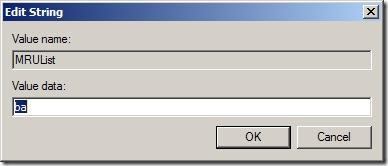
4. Double click the MRUList and delete everything from the value data box.


5. And this will delete everything from your run prompt. Your run prompt should look like unused and fresh    now.


{[['']]}

How To Track Your Backlinks By Using Google Analytics


Few days ago Google Analytics team announced the new feature to track backlinks to your contents pages using its “Social Reports” feature. Knowing what your backlinks are, and where they're coming from can provide you with useful insights, and can help you filter out the cheap links in favor of quality ones. Yeah, no more automated tools or manual quarries needed to keep track of your backlinks, Google will now do it for you for free, for your thousands of content pages. The Social section at Google Analytics was there since a while which already tracking your website’s activity at various social networks like Facebook, Twitter, YouTube etc. and now this really awesome addition keeps lets you know which sites are talking about your content.

You Can Track Backlinks Using Google Analytics, Google Analytics Released one of the best tool you can use to analyze your backlinks. if you want to use this just follow the steps below.

1. Log into your Google Analytics Account, and then click on the website property you want to see backlinks for.

2. Look left sidebar, and there you'll see a Standard Reports section. Click on the Traffic Sources tab, expand the Social section, and then click on Trackbacks.


A trackback is basically a notification for every time a website links to another. It is a record of what page on one website linked to another page on another website. Each trackback in this case will contain the linking URL, and the linked URL. You can also see how many visits were generated as a result of each backlink, so that you can contact that website and arrange for more backlinks to increase your traffic!

Now, you will see a list of all trackbacks to your website within a specific period of time. You can change this period, and show backlinks from a month ago, or a week ago, and so on. This feature is useful when you want to see how many backlinks you 'scored' during a particular campaign.

I hope we explain Every thing about backlinks is perfect if you have nay suggestion about link tracking.  let me know by posting a comment below in comment forum. Got any more questions? Please feel free to post any query in the comments section below.


{[['']]}
 
Support : Creating Website | Johny Template | Mas Template
Copyright © 2013. FUN9UP - All Rights Reserved
Template Created by Creating Website Published by Mas Template
Proudly powered by Blogger Proudly powered by Blogger Proudly powered by Blogger